Samsung Galaxy AI Features Review – Truly Useful or Just Marketing?
Over the past few years, Galaxy AI has been a major talking point regarding Samsung Galaxy phones. When buying a smartphone, it is customary to discuss specifications like the camera, display, processor, and battery; however, we have now started discussing AI features alongside them.
Samsung integrates AI into its Galaxy smartphones in various ways. From photo editing to writing assistance, translation to search, and notes and productivity to everyday smartphone tasks, AI features have gradually become an integral part of the smartphone experience.
But there is an important question here:
“Is Galaxy AI truly useful in our daily lives, or is it merely a marketing term used to position the smartphone as a premium product?”
This question cannot be answered with a simple “yes” or “no.”
Some Galaxy AI features are genuinely useful in daily life. There are others we might try once and never use again. Then there are features that may be particularly beneficial for power users, students, professionals, or content creators.
In this article, we will explore the key features of Samsung Galaxy AI, where they are truly useful, their limitations, whether one should rely heavily on AI, and ultimately, whether Galaxy AI is just marketing hype or genuinely useful technology.
What is Galaxy AI?
Galaxy AI is a collection of AI-based features and services integrated into Samsung Galaxy devices.
Its goal is to simplify certain tasks performed by the user, rather than keeping the phone merely as a communication device.
For instance, AI-based editing can help remove unwanted objects from a photo.
AI can assist in converting a long note into a concise summary.
Translation tools can help understand conversations in foreign languages.
Visual search features can help you search for information about an object in a photo or on your screen.
In essence, the core idea behind Galaxy AI is: “Let the phone itself make some of your tasks easier.”
This concept is excellent.
However, we need to examine how useful it actually proves to be in real-world usage. Circle to Search – A truly useful feature.
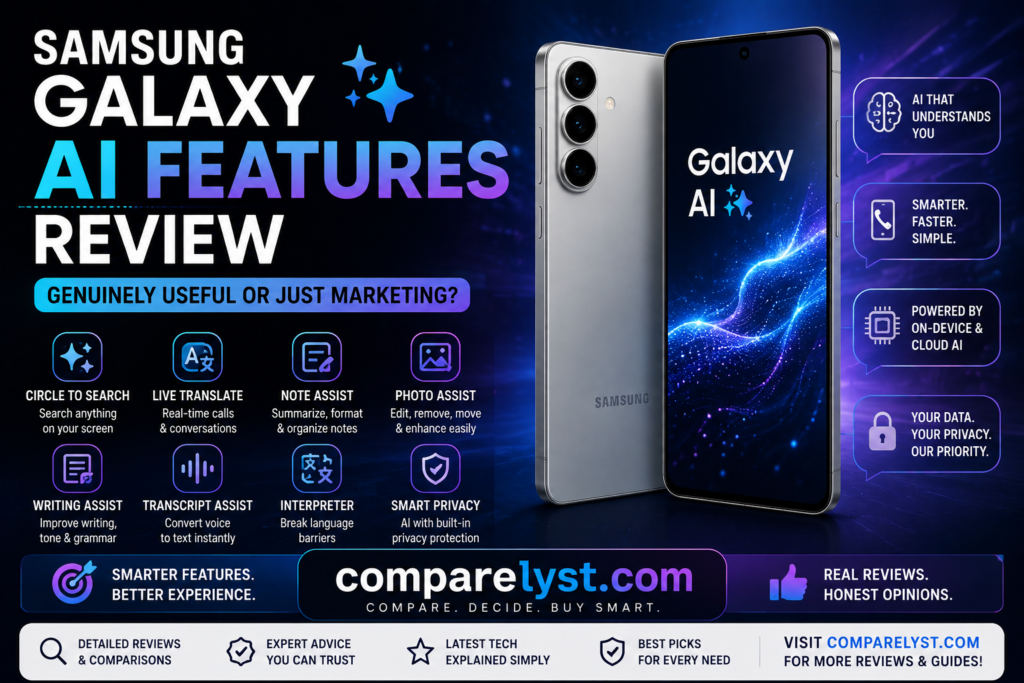
Circle to Search is one of the features in the Galaxy AI ecosystem that I find particularly practical.
Imagine you come across an item you don’t recognize on a website, an Instagram post, a YouTube video, or in an image.
Instead of taking a screenshot and searching for it separately, you can simply select or circle that specific object or text right on the screen to search for it.
Its main advantage is simplicity.
You might see a product…
…but not know its name.
This eliminates the need to manually describe it in a search engine.
It can be useful for identifying items like shoes, watches, landmarks, or accessories.
This feature is also practical when traveling.
It makes searching easy if you come across a signboard or an unfamiliar object.
Thus, Circle to Search is not just an “AI demo”; it is a feature capable of becoming a staple of everyday smartphone use.
However, there may be requirements regarding internet connectivity and supported devices or apps. Also, one should not expect it to work identically across all applications or with protected content.
Writing Assist – Useful for working professionals
We type a lot of messages every day.
We often need to write WhatsApp messages, emails, professional communications, and social media captions.
Sometimes, we might wonder if a message is correct, grammatically sound, or professional enough.
Galaxy AI’s writing-related tools can help in such situations.
AI can simplify tasks like changing the tone of a message, improving grammar or spelling, and translating text.
For instance, you might need to convert a casual message intended for a friend into a professional one.
Or, you might want to make an office email sound more polished.
In these situations, Writing Assist is genuinely useful.
However, there is an important point to consider.
You shouldn’t blindly copy and send what the AI has written.
Sometimes, an AI-generated sentence might not accurately reflect your actual intent.
Therefore, it is best to use AI as a writing assistant.
Treating it as a writer that does all the thinking for you is not the right approach.
Samsung’s current Galaxy AI documentation highlights capabilities such as translation, composing, writing style adjustments, and grammar correction.
Live Translate – Truly useful while traveling
The language barrier remains one of the key challenges that smartphone technology needs to solve.
Galaxy AI’s translation features aim to address this issue.
Imagine someone is speaking a different language.
You do not understand that language.
In this situation, real-time translation tools can be helpful.
This is particularly useful when traveling.
Translation assistance is practical for situations like booking a hotel, conversing at a restaurant, asking for directions, or basic communication.
However, one should not assume that the translation will be 100% perfect.
Factors such as accents, background noise, slang, regional vocabulary, and context can affect translation quality.
Therefore, it is advisable to verify AI-generated translations when dealing with important legal, financial, or highly sensitive communications.
Interpreter – Is it helpful for face-to-face conversations?
Interpreter-style AI features aim to facilitate easier communication between people who speak different languages.
This is useful for travel or international communication.
One person speaks in one language.
The other person responds in a different language.
The phone can display translation information for both parties.
While this concept might seem futuristic, its value becomes apparent in real-world travel situations.
However, one should not assume it is perfect enough to replace a professional human interpreter.
It serves as a good assistant for simple, everyday conversations.
Human verification remains crucial for complex discussions.
Note Assist – Useful for students and professionals
Do you attend meetings?
Do you take notes during classes or lectures?
Do you maintain extensive notes?
If so, features like Note Assist can be very useful.
AI can assist with tasks such as organizing, summarizing, and formatting long notes.
After a meeting, instead of spending 20 or 30 minutes reading through notes, being able to view just the key points saves time.
It is also useful for students.
If you have a large set of notes, AI assistance can help identify important points.
However, there is a caveat here as well.
An AI summary might miss certain important details.
Therefore, in situations like exam preparation or important business meetings, you should not rely solely on the AI summary; you should also review the original notes.
Transcript Assist – How useful is it for meeting participants?
Converting voice recordings into text transcripts is useful for many users.
Imagine you have recorded a meeting.
Listening to the entire recording again is time-consuming.
With a transcript, you can scan the text and quickly locate key sections.
Some AI tools can also help generate summaries.
This is useful for remote workers, students, journalists, interviewers, and business professionals.
However, transcription accuracy can vary depending on the environment.
Mistakes can occur due to multiple people speaking simultaneously, background noise, accents, or unclear audio.
Therefore, it is advisable to verify the transcript before using it as a final official record.
Browsing Assist – No time to read long articles?
You might need to read a lengthy article or a long webpage on the internet.
But you may not have the time to read the entire article.
AI-based browsing assistance can help provide a summary or translation in such situations.
This allows you to understand the information quickly.
However, there is a significant limitation here.
A summary is not the original article.
An AI summary might skip important context.
A summary alone is insufficient if you need to fully understand a news article, financial information, or a technical document.
It is useful for a quick overview.
The original source is crucial for making a final decision.
Photo Assist – AI editing is truly impressive.
Photography is another interesting area for Galaxy AI.
After taking a photo, there might be unwanted objects.
Someone might have accidentally wandered into the background.
The photo composition might not be quite right.
You might need to move an object or adjust the image.
AI editing tools make these kinds of tasks easier.
Previously, you might have needed a separate photo editing application for this.
Now, you can perform some editing tasks right on the phone.
This is genuinely useful.
It is a major advantage, particularly for casual photographers.
Generative Edit – Does it work perfectly?
AI-based generative editing is very powerful.
But it is not perfect.
After removing an object, the AI has to generate the background.
Sometimes, it yields a natural-looking result.
At other times, strange details may appear.
Mistakes are likely to occur in areas involving people, hands, text, or complex backgrounds.
Therefore, it is advisable to zoom in and check the image before uploading it.
You should verify that the AI-edited photo looks authentic before using it.
Transparency regarding AI-generated modifications is crucial, especially in news, professional documentation, or sensitive situations.
Sketch to Image – A fun feature or a useful tool?
You create a simple drawing.
It can be transformed into an AI-generated image.
This is interesting for creative users.
It can also serve as a brainstorming tool for kids, students, and designers.
However, it isn’t necessarily a feature everyone would use daily.
It is great fun to try out once.
But its value for long-term, daily use depends on the individual user.
Features like this represent the intersection of marketing and genuine utility within Galaxy AI.
The technology is impressive.
But its usefulness is a personal matter.
Will all Galaxy AI features be available on every phone?
This is a crucial point.
No.
An AI feature present on one Galaxy phone isn’t necessarily available on another.
Feature availability can vary based on the model, processor, software version, region, and supported services.
Samsung notes that supported devices and feature availability are subject to change. Some AI functions may require a Samsung account or software updates.
Therefore, instead of buying a phone simply because it is labeled a “Galaxy AI phone,” it is best to check if the specific model you intend to buy includes the AI features you need.
Is Galaxy AI free or paid?
This is another common question users have about Galaxy AI.
Basic Samsung Galaxy AI features are provided for free on many devices.
However, future AI services, enhanced features, or third-party AI services may be subject to different terms or charges.
So, one shouldn’t assume that buying an “AI phone” guarantees lifetime free access to all AI services.
Terms and availability may change over time.
Should you be concerned about AI privacy?
Privacy is a key consideration when using AI features.
Some AI processing may occur directly on the phone.
Other features might rely on cloud-based processing.
Therefore, when using AI tools with sensitive information, it is wise to understand how that specific feature processes data.
Samsung utilizes a combination of on-device AI and cloud AI for certain Galaxy AI capabilities.
There are even options like AI data controls available for business users.
A practical rule:
Be selective about the information you provide to an AI tool. Do not use passwords, banking information, or highly confidential documents in unnecessary AI prompts.
Does Galaxy AI consume a lot of battery?
AI features can utilize processor and network resources.
However, not all AI features consume the same amount of battery.
A simple text operation and AI image generation do not involve the same workload.
Demanding tasks like camera AI processing, image editing, and voice transcription can increase battery consumption.
Therefore, one cannot say that a phone’s battery performance will be poor simply because it is Galaxy AI-enabled.
Your actual usage is what matters most.
Where does the marketing for Galaxy AI come in?
It is true that Samsung promotes AI as a key selling point of the flagship smartphone experience.
The term “AI” is currently very powerful in smartphone marketing.
Terms like “AI camera,” “AI editing,” “AI assistant,” and “AI search” attract consumer attention.
However, a feature does not automatically become useful just because it is labeled as “AI.”
A feature holds real value only if it solves a daily problem.
A feature like “Circle to Search” is useful if it makes everyday searching easier.
“Writing Assist” is useful if it improves communication.
“Note Assist” is useful if it saves time.
However, if a feature offers an impressive demo but isn’t practical for daily use, it might simply have high marketing value.
What are the most useful features of Galaxy AI?
The ranking may vary from user to user.
Generally, however, features like search-related AI, translation, writing assistance, photo editing, and note summarization can offer practical value to everyday users.
Notes and transcription are useful for students.
Writing assistance, meeting transcription, and summaries are useful for professionals.
Translation and interpretation tools are useful for travelers.
AI photo editing is useful for photographers.
“Circle to Search” and writing tools are useful for casual users.
Thus, Galaxy AI’s strength lies not in a single “killer feature.”
Its strength comes from the overall experience created by combining several small, useful features.
What are the limitations of Galaxy AI?
First, AI is not perfect.
It can produce incorrect answers or inaccurate summaries.
Second, feature availability may vary depending on the model and region.
Third, some features may require an internet connection.
Fourth, there is a possibility that some advanced AI features could become paid services in the future. Fifth, AI-generated photo edits may not always look natural.
Sixth, the accuracy of translation and transcription can vary depending on the environment.
Therefore, using AI as an assistant is the right approach.
Relying on it as the final authority is not appropriate.
Who benefits the most from Galaxy AI?
For an average smartphone user, Galaxy AI is a nice bonus.
However, for content creators, students, professionals, travelers, or productivity-focused users, its value can be significantly higher.
If you take notes daily, Note-related AI features will be useful.
If you engage in international communication, translation features will be useful.
If you create social media content, photo editing tools will be useful.
If you conduct a lot of online research, visual search will be useful.
Ultimately, the value of Galaxy AI depends on your lifestyle.
Should you buy a Samsung phone solely for Galaxy AI?
In my view, buying a phone based only on AI is not the right decision.
When purchasing a smartphone, you should also consider factors like the processor, display, camera, battery, software support, build quality, and price.
AI is certainly a key feature of the package.
However, if you do not like the phone’s other hardware aspects, AI alone cannot justify the purchase.
First, you need to check which model offers the specific AI features you require.
Then, you should evaluate the phone’s overall value.
Galaxy AI vs. Traditional Smartphone Features
An interesting point is that you can use a smartphone without AI.
You can edit photos manually.
You can search on Google.
You can use translation apps.
You can organize notes manually.
You can use grammar-checking apps.
So, what exactly does Galaxy AI change?
It attempts to perform these tasks within a single ecosystem and in fewer steps.
That is where the convenience lies.
AI does not create a new category of tasks.
Instead, it makes many existing tasks faster and easier to perform.
Understanding this point helps you grasp the true value of Galaxy AI.
Final Verdict – Is Galaxy AI truly useful, or just marketing?
It is both.
Yes, there is a marketing component to Galaxy AI.
Samsung uses AI branding to differentiate its latest smartphones.
However, that doesn’t mean Galaxy AI is *entirely* about marketing.
Features like Circle to Search, translation, writing assistance, note summarization, transcription, and AI photo editing can solve real, everyday problems.
At the same time, not every AI feature will be useful to every user.
One person might use AI photo editing daily.
Another might have no need for it at all.
A student might use the transcription feature every day.
A casual user might not use it even once.
Therefore, the value of Galaxy AI lies not in the *number* of features, but in how those features are *used*.
When buying a Samsung phone, instead of asking, “How many AI features does it have?”
It is better to ask, “Which AI features do I actually need?”
If you are a content creator, AI editing might be important to you.
If you are a student, notes and transcription might be important.
If you are a traveler, translation might be important.
If you are an office professional, writing assistance and summaries might be important.
For a casual user, even a simple feature like Circle to Search can provide sufficient value.
So, there is no need to view Galaxy AI as some sort of magical technology.
By the same token, there is no need to dismiss it as merely a marketing gimmick.
Galaxy AI is a collection of tools designed to make the smartphone experience incrementally easier.
For the right user, it is genuinely useful.
For the wrong user, it will simply remain a set of unused features on the phone.
Ultimately, when buying a smartphone, one simple rule matters most:
It is not just about having *many* AI features; it is about having features that *you* will use daily.
Samsung Galaxy AI passes that test in many areas.
However, its true value depends on your usage patterns.
It is not just marketing. It is not magic. If used correctly, it is a genuinely useful smartphone toolset.
Comparelyst.com – Compare. Decide. Buy Smart.
Frequently Asked Questions
- What is Galaxy AI?
Galaxy AI is a suite of AI-powered features and services offered on Samsung Galaxy smartphones and other compatible Galaxy devices. It is utilized in various areas such as search, translation, writing, note-taking, transcription, and photo editing.
2. Will Galaxy AI be available on all Samsung phones?
No. AI features may vary depending on the device model, software version, region, and supported services. It is advisable to check the supported features for the specific model before purchasing a phone.
3. Is Galaxy AI actually useful?
Yes, some features are genuinely useful. Features like search, translation, writing assistance, note summarization, transcription, and photo editing can save time for the right user.
4. Is Galaxy AI just a marketing gimmick?
It cannot be dismissed merely as marketing. Some features solve real-world problems. However, not every AI feature is equally useful to every user.
5. Is an internet connection required to use Galaxy AI?
Requirements vary depending on the feature. Some AI tasks utilize on-device processing, while others may require internet access or cloud processing.
6. Is Galaxy AI free?
Many basic Galaxy AI features provided by Samsung are free. However, enhanced or third-party AI services may be subject to different terms or charges.
7. Is AI-generated photo editing safe?
It is useful for casual photography and creative editing. However, when using AI-edited images for important documentation or sensitive situations, it is best to verify the accuracy of the output.
8. Is Galaxy AI a primary reason to buy a phone?
There is no need to buy a phone solely for AI. One should consider the overall value by weighing AI features alongside factors like the processor, camera, display, battery, software support, and price.
9. Who benefits most from Galaxy AI?
AI tools can offer significant value to students, professionals, travelers, content creators, and productivity-focused users. However, even casual users may find certain simple AI features helpful in their daily routines.
10. What is the biggest advantage of Galaxy AI?
It is not just about a single feature. The key advantage of Galaxy AI is its ability to facilitate various everyday tasks—such as search, communication, productivity, and creative work—directly on the phone with fewer steps.
At Comparelyst.com, you can easily find the information you need to buy your next smartphone through smartphone comparisons, camera guides, display comparisons, performance articles, and mobile technology information.
Disclosure: As an Amazon Associate, Comparelyst earns from qualifying purchases.